Aqua Voice Review
Cloud-only dictation with always-on AI cleanup
Aqua Voice is a voice dictation app for macOS and Windows with cloud-based AI transcription. Priced at $10/month. This independent review covers WER/CER accuracy across 6 test recordings, a privacy analysis, and a UX verdict.
Aqua Voice Verdict
Very accurate and clean out of the box, held back by a tiny free cap and an easy-to-misfire hotkey
Aqua Voice version 0.14.17 scores 7.6/10 overall in Voice-list independent testing (tested 2026-06-10). Default achieves 1.5% aggregate WER across 6 recordings.
Works well for
- Top-tier accuracy out of the box — 2.0% aggregate WER, zero errors on noise and numbers, no drift over long-form
- AI cleanup is always on: punctuation, capitalisation and filler removal out of the box
- Clear recording overlay, fast onboarding and understandable error messages
Watch out for
- Free tier is a one-off 1,000-word cap, then a hard paywall — not a free tier you can live on
- The same key is bound to push-to-talk, hands-free and cancel by default — easy to misfire
- No offline mode and no model picker on the free tier — both are Pro-only
Best for
- Cloud-comfortable Mac or Windows users who want highly accurate dictation with punctuation and filler-removal handled automatically
Not for
- Anyone who needs an offline mode on the free tier, or a free tier they can actually live on
Aqua Voice Accuracy & Speed
| Model | Accuracy | Speed | ||
|---|---|---|---|---|
| English | Cloud | Default Only model Aqua Voice's default cloud model — the only one you get without paying (Pro adds Avalon and Avalon 1.5, which we could not test). The free allowance is a one-off 1,000 words, so this is really a trial, not a free tier. AI cleanup (filler removal, capitalisation, punctuation, ITN) is always on; the History view can show the raw pre-cleanup transcript. There is no local mode without Pro. One cloud model on the free tier — the model picker (Avalon) is Pro-only | 98.5%
Word accuracy
The share of words the model got right (100% − word error rate). 100% = every word correct.
1.5% WER Word Error Rate
What % of words the model got wrong. 0% = every word correct.
0.8% CER Character Error Rate
Same as WER but measured letter-by-letter. Usually lower than WER.
16% PER Punctuation Error Rate
How accurately the model placed commas, periods, and other punctuation.
9 / 10 |
~1s
1–2s range
Post-stop latency
Seconds from pressing Stop to the final text appearing in your active app. Average across all test recordings.
10 / 10 |
| No models match — turn a filter back on. | ||||
Aqua Voice for Coding & IT
Coding
- Punctuation and capitalisation handled automatically
- No dropped segments
- Throat-clearing lead-in ("OK, so…") cleaned away without losing content
- "Tauri" → "Atari"
- "Axum" → "AXM"
- "ImagePullBackOff" split into three words
Conference
- Accented speaker handled almost perfectly
- Tech terms (whisper.cpp, Parakeet TDT) correct
- Occasional connector smoothing from cleanup
Aqua Voice for Everyday & Long-form
Casual
- Near-perfect on conversational speech
- List structure and numbering preserved correctly
- Minor connector differences from cleanup
Long-form
- No drift over 3+ minutes — consistent to the end
- Numbers, currency and percentages formatted correctly throughout
- Spoken "1./2./3." list rendered as a clean numbered list
- A few connector words smoothed by auto-cleanup
Aqua Voice for Numbers & Structured Data
Numbers/ITN
- ITN strong: "$12,400.75", "1-800-555-0123", "ABC-123456" correct
- Date and time formatted correctly
- Lead-in "Okay," cleaned away — zero errors on this recording
Aqua Voice: Noise Resistance
Noisy Cafe
- Café noise had no measurable effect — clean transcript
- Auto-punctuation and capitalisation correct
Tested on Windows 11 26H2 · AMD Ryzen AI 9 HX 370 · 32 GB RAM
Aqua Voice UX & Integration
Getting started & flow
Reached a first successful dictation in about a minute, without superfluous questions.
Some keys cannot be assigned, combinations are set in an awkward way, and certain keys are misread. By default one key triggers push-to-talk, hands-free and cancel at once.
Understandable error messages.
Recording experience
Clear recording indicator.
Stop/cancel works fine.
Auto-insert works everywhere, as with most apps.
Auto-inserts text but does not restore the clipboard.
Managing your work
History exists and can show the raw pre-AI transcript, which is genuinely useful. No export.
No writing modes or presets, and the model picker (Avalon) is Pro-only — on the free tier there is nothing to switch.
~480 MB RAM · 14% CPU at rest (cloud).
Aqua Voice Features
Text processing
Cloud LLM cleanup and rewrite; History keeps the raw pre-cleanup transcript.
5 entries free, up to 800 on Pro — auto-replace before insertion.
Text expansion supported.
Output & extras
Partial: in streaming mode you can say "erase everything" and it clears the text, but nothing else.
No built-in translation mode.
No Ask / Q&A LLM mode.
No txt / srt / json export.
Local recognition
Offline is advertised but Pro-locked, so it could not be verified.
Avalon / Avalon 1.5 — Pro only, not tested.
Aqua Voice Privacy
Aqua Voice streams audio to awsglobalaccelerator.com on every recording.
Endpoints: awsglobalaccelerator.com, elb.amazonaws.com, cloudfront.net, ingest.us.sentry.io, s3.us-east-1.amazonaws.com
Nothing is uploaded until you confirm by pressing Stop. Cancel before then and the audio never leaves.
You must create an account (email) to use the app at all — your dictation is tied to an identity.
Your recordings are not used to train models.
Analytics and tracking cannot be fully disabled (e.g. Google Analytics, ad attribution).
History is always stored — there is no way to disable it.
From the privacy policy not scored
- We tested the free tier, which is cloud-only: audio leaves the device for Aqua’s AWS backend.
- An offline mode is advertised on Pro but is locked on the free tier, so we could not verify it.
- Crash and usage telemetry is sent to Sentry; there is no visible tracking opt-out.
- Training opt-out is offered during onboarding.
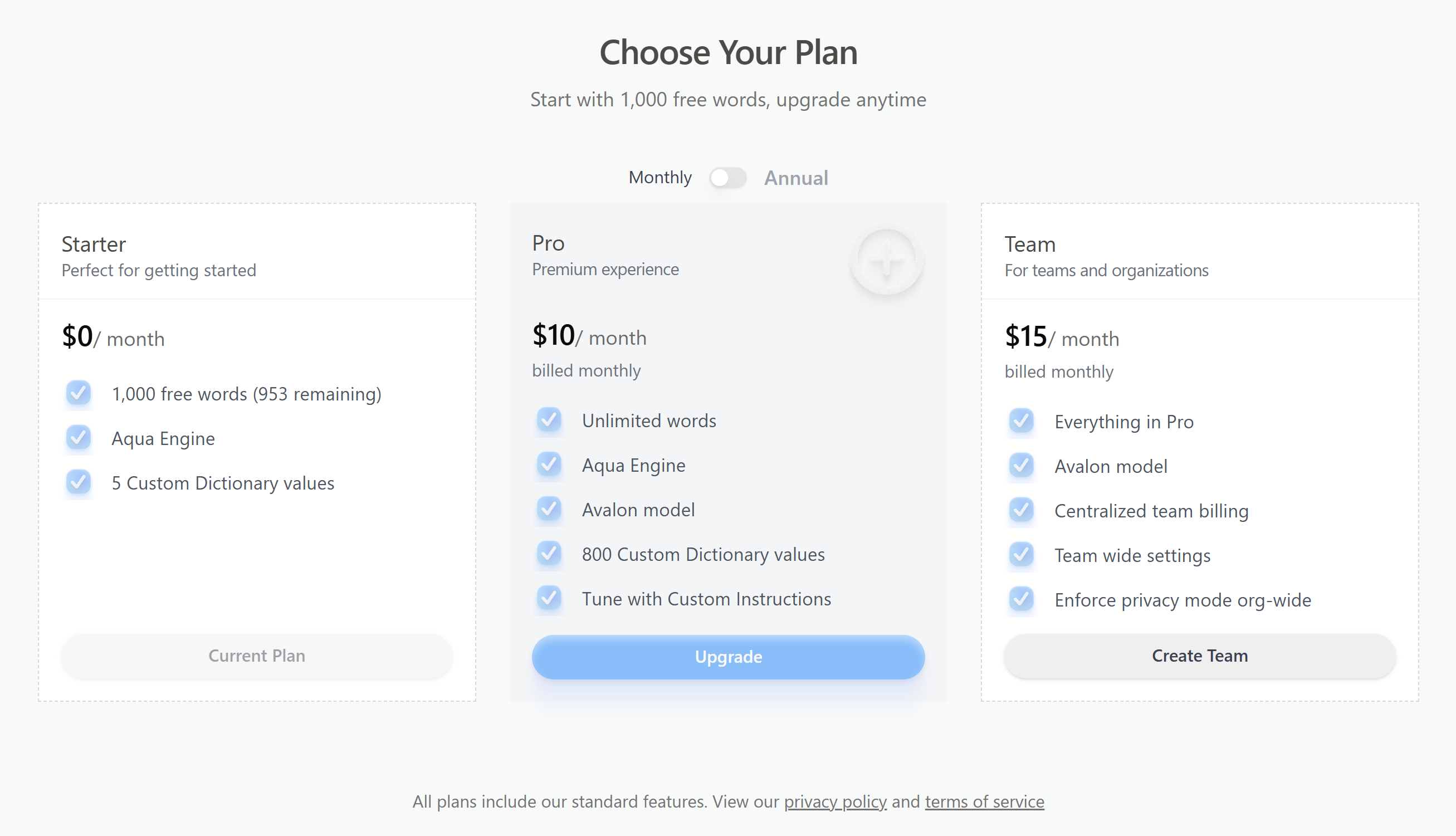
Pricing
- 1,000 words total (one-off, not recurring)
- Default cloud model only
- Custom dictionary (5 entries) and snippets
- AI cleanup: punctuation, capitalisation, filler removal
- Unlimited dictation
- Avalon and Avalon 1.5 models (not tested)
- Custom dictionary up to 800 entries
- Custom LLM instructions and an offline mode
- No lifetime / one-time option — subscription only
Aqua Voice on the free tier
How far Aqua Voice gets you without paying — the basis for its Best free option ranking.
- Free limit
- 1,000 words total (one-off, not recurring)
- Account required
- Yes — sign-up needed
What you get for free
- 1,000 words total (one-off, not recurring)
- Default cloud model only
- Custom dictionary (5 entries) and snippets
- AI cleanup: punctuation, capitalisation, filler removal
Methodology
Accuracy scores use WER (Word Error Rate) computed against multi-reference ground truth
with {a|b} alternates for valid transcription variants (e.g. 48% and
forty-eight percent are both accepted). Audio delivered via virtual cable from
ElevenLabs TTS. Single test session on 2026-06-10.
Aqua Voice benchmarks
How Aqua Voice places against every app we tested, on identical audio.
Aqua Voice screenshots
Actual screenshots from our test session — click any image to view full size.
Aqua Voice head-to-head
See Aqua Voice compared point by point against the alternatives.