Willow Voice Review
Fast, polished dictation in a Mac-first wrapper
Willow Voice is a voice dictation app for macOS and Windows with cloud-based AI transcription. Priced at $15/month. This independent review covers WER/CER accuracy across 6 test recordings, a privacy analysis, and a UX verdict.
Willow Voice Verdict
A near-identical Wispr Flow clone: very fast, very clean, cloud by default
Willow Voice version 2.1.2 scores 7.2/10 overall in Voice-list independent testing (tested 2026-06-09). Cloud achieves 0.9% aggregate WER across 6 recordings.
Works well for
- Near-instant results: 0–2s, audio streamed as you speak
- Excellent accuracy out of the box — 1.5% aggregate WER, flawless on numbers and dates
- Polished, genuinely pleasant Mac-style UX and onboarding
Watch out for
- Heavy tracking that cannot be disabled — Sentry, PostHog, S3, Loom all fire even while idle
- Free tier is cloud-only; a local/offline mode exists but is locked behind Pro and could not be verified
- Windows build has no platform-specific polish — it is the Mac app in a Windows window
Best for
- Mac or Windows users who are happy in the cloud and want polished English dictation with near-instant results and zero model-picking
Not for
- Privacy-conscious users — tracking is extensive and cannot be turned off — and anyone who needs an offline mode they can actually verify (it exists only on Pro and we could not test it)
Willow Voice Accuracy & Speed
| Model | Accuracy | Speed | ||
|---|---|---|---|---|
| English | Cloud | Cloud Free tier Willow Voice's cloud model — the only one available on the free tier (there is no model picker, just a language list). A local/offline mode is advertised on Pro but is locked, so we could not test it. Auto-cleanup (disfluency removal, capitalisation, punctuation, ITN) is always on; a separate Scribe mode applies a full LLM rewrite (paid). One cloud model for everyone — free tier only lets you pick a recognition language | 99.1%
Word accuracy
The share of words the model got right (100% − word error rate). 100% = every word correct.
0.9% WER Word Error Rate
What % of words the model got wrong. 0% = every word correct.
0.3% CER Character Error Rate
Same as WER but measured letter-by-letter. Usually lower than WER.
26% PER Punctuation Error Rate
How accurately the model placed commas, periods, and other punctuation.
10 / 10 |
~1s
0–2s range
Post-stop latency
Seconds from pressing Stop to the final text appearing in your active app. Average across all test recordings.
10 / 10 |
| No models match — turn a filter back on. | ||||
Willow Voice for Coding & IT
Coding
- Auto-cleanup: punctuation and capitalisation correct
- No hallucinations or dropped segments
- "Tauri" → "Atari"
- "last_seen_at" → "lastscene_at"
- "ImagePullBackOff" and "rust-toolchain.toml" split apart
Conference
- Handles accented speaker almost perfectly
- Zero dropped sentences
- Tech terms (whisper.cpp, Parakeet TDT, Gerganov) all correct
- "per-minute" → "permanent" (single misheard term)
Willow Voice for Everyday & Long-form
Casual
- Near-perfect — only one dropped connector
- Auto-cleanup: caps, punctuation and list formatting all correct
- Dropped one spoken "so"
Long-form
- No drift over 4:00 — consistent throughout
- All numbers, currency and percentages formatted correctly
- Zero hallucinations
- Auto-cleanup removed several spoken "so"/"and" connectors
Willow Voice for Numbers & Structured Data
Numbers/ITN
- Perfect ITN: "$12,400.75", "1-800-555-0123 ext. 479", "ABC-123456" all exact
- Date "March 15th, 2026 at 3:30 PM" formatted correctly
Willow Voice: Noise Resistance
Noisy Cafe
- Café noise has no effect — identical to clean version
- Dropped one spoken "so" (same as clean)
Tested on Windows 11 26H2 · AMD Ryzen AI 9 HX 370 · 32 GB RAM
Willow Voice UX & Integration
Getting started & flow
2–3 minutes, but several of the interactive tests ran unreliably.
Sensible defaults, but limited variety — some combos are blocked, mouse buttons and double-taps cannot be bound, and it froze during setup once.
Clear, understandable error messages.
Recording experience
The recording pill is clear and well done.
Works, but the cancel key is not shown.
Auto-insert works everywhere tested.
Auto-inserts by default with a hotkey to re-insert the last text, but it does not restore your clipboard.
Managing your work
A history list exists on the home screen, but there is no export.
No preset list — style adapts per app — and a dedicated hotkey toggles Scribe (LLM) mode.
~100 MB RAM · 0.3% CPU at rest (cloud).
Willow Voice Features
Text processing
Cloud LLM: both per-app style adaptation and a full-rewrite Scribe mode (the rewrite key does nothing on the free tier).
Per-word auto-replace before insertion.
Text expansion via "Personal shortcuts".
Output & extras
No built-in translation mode.
No Ask / Q&A LLM mode.
No txt / srt / json export.
Local recognition
Offline is advertised but Pro-locked, so it could not be verified.
A single cloud model — nothing to pick.
Willow Voice Privacy
Willow Voice streams audio to api.willowvoice.com on every recording — upload begins while you are still speaking, before you press Stop. Beyond audio: Training opt-out is offered, but tracking cannot be disabled and is extensive: Sentry crash data, PostHog product analytics, S3 uploads and Loom all fire — including while idle.
Endpoints: api.willowvoice.com, sentry.io, posthog, s3-r-w.us-east-1.amazonaws.com, cdn.loom.com
Recording is streamed to the server while you talk — if you cancel, it has already left your device.
You must create an account (email) to use the app at all — your dictation is tied to an identity.
Training opt-out is offered, but tracking cannot be disabled and is extensive: Sentry crash data, PostHog product analytics, S3 uploads and Loom all fire — including while idle.
Your recordings are not used to train models.
Analytics and tracking cannot be fully disabled (e.g. Google Analytics, ad attribution).
History is always stored — there is no way to disable it.
From the privacy policy not scored
- We tested the free tier, which is cloud-only: audio is streamed to api.willowvoice.com live, before you press stop.
- An offline/local mode is advertised on Pro but is locked on the free tier, so we could not confirm whether it truly keeps audio on-device.
- Telemetry endpoints (Sentry, PostHog, S3, Loom) are contacted even during idle with the mic on.
- Training opt-out is presented during onboarding, but it only blocks model training — not analytics or tracking.
Pricing
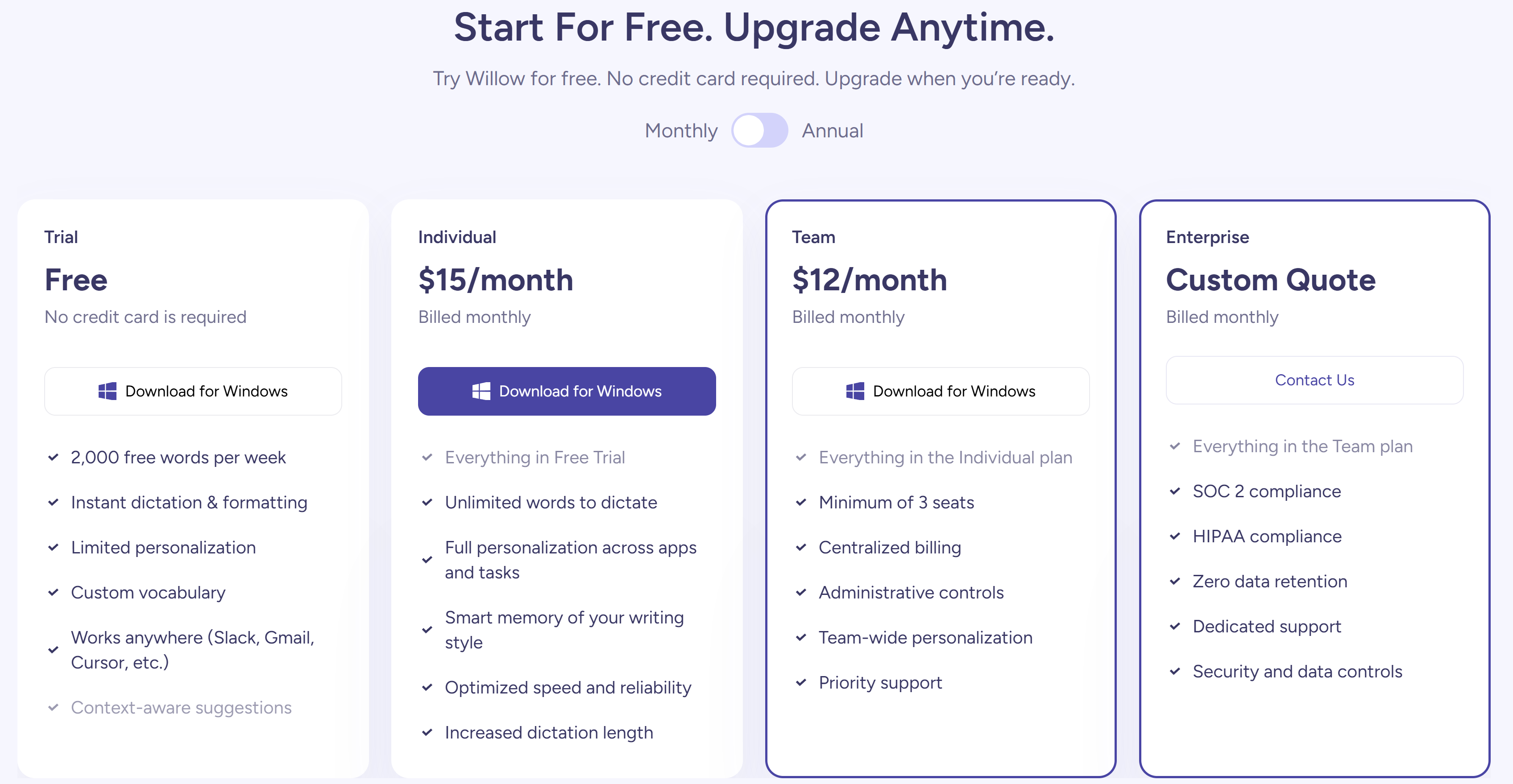
- 2,000 words per week
- Instant dictation & formatting
- Custom vocabulary
- Works across apps (Slack, Gmail, Cursor…)
- Unlimited dictation words
- Full personalization across apps and tasks
- Smart memory of your writing style
- Increased dictation length
- No lifetime / one-time option — subscription only
Willow Voice on the free tier
How far Willow Voice gets you without paying — the basis for its Best free option ranking.
- Free limit
- 2,000 words per week
- Account required
- Yes — sign-up needed
What you get for free
- 2,000 words per week
- Instant dictation & formatting
- Custom vocabulary
- Works across apps (Slack, Gmail, Cursor…)
Methodology
Accuracy scores use WER (Word Error Rate) computed against multi-reference ground truth
with {a|b} alternates for valid transcription variants (e.g. 48% and
forty-eight percent are both accepted). Audio delivered via virtual cable from
ElevenLabs TTS. Single test session on 2026-06-09.
Willow Voice benchmarks
How Willow Voice places against every app we tested, on identical audio.
Willow Voice screenshots
Actual screenshots from our test session — click any image to view full size.
Willow Voice head-to-head
See Willow Voice compared point by point against the alternatives.